
Release Date: 18 December 2025
Requirements
- Windows 10 or 11
- Texpress 11.0.015 or later
- TexAPI 6.1.002 or later
- Perl 5.12.0 or later
New Features
Since EMu 9.0 a number of web tools and services that were separately licensed add-ons to EMu are now bundled with EMu. The EMu 10 release has seen many improvements to Axiell Sapphire and Axiell Go, as well as improvements to EMu itself.
JSON export format
The Texpress texforms module supports a general purpose data exporting facility. Previously, five predefined export formats were supported by the Texpress texeport program:
- Comma delimited
- Fixed width
- Ids
- Ids (brief)
- Texpress data
Support for JSON as an export format is available from EMu 10 and Texpress 11.0.015 onwards. The -f option, which specifies the output format, now also supports the following four JSON formats:
- json
- jsonbrief
- jsonql
- jsonqlbrief
More details in the EMu Help.
Label Registry entry
With the Label Registry entry it is possible to replace a default EMu field label with a label of your own, for example, replacing the default field label of First: (for the NamFirst column) in the Parties module with Given Name:.
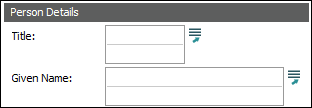
Full details in the EMu Help.
Parties Module
An enhanced version of the Parties module is available from EMu 10, with new Party Types, additional and changed tabs and, in some cases, new functionality. Several Registry entries have been introduced that enable institutions to use Standards module definitions rather than EMu's default method for generation of derived names (on the Persons tab), and the format of address strings (on the Address tab). Tab size has been increased to allow more information to be included on a tab.
Current EMu users have the option to install the enhanced Parties module when upgrading to EMu 10, or at a later date, or they can continue to use the default version of the module.
Full details in the EMu Help.
Standards module
A new Field Definition Record Type has been added to the Standards module, allowing a value to be calculated for any field in any module. A Field Definition record includes a script that is executed whenever a record is created or modified, the result of which is a value that is assigned to a field immediately before the record is saved. As a result, it is now possible to define your own Summary Data, Extended Data or indeed any field calculations without the need to have Axiell modify the database forms.
The new Calculated Registry entry is used to control which fields have calculated values. Support is provided for both single and multiple value fields.
Details in the EMu Help.
Admin Task for viewing module validation
A new Admin Task (View module validation) has been added to allow users to view the validation code which is run when a record is saved to generate record values such as Summary Data.
Upgraded Crystal reports Viewer
Two runtime versions of the Crystal Reports Viewer are provided with EMu 10: Crystal 11.5 (32 bit) and Crystal 2025 (64 bit).
Full details in the EMu Help.
PowerBI Report type added
A new report type of Microsoft PowerBI Report has been added to allow reporting in PowerBI from EMu.
Full details in the EMu Help.
Axiell Sapphire
Full details about Axiell Sapphire 10.0 can be found in the EMu Help. Improvements include:
- Upgraded Image control, including new annotate and draw options.
- New Project element available: Tasks. With a Task it is possible to work through multiple Forms in sequence without the need to select each Form separately from the Dashboard.
- Enhanced data entry in tables.
- The option to use OpenId for login.
Axiell Go
Full details about Axiell Go 10.0 can be found in the EMu Help. Improvements include:
- Query by form
- Command Centre for module selection
- The use of OpenId for login
- List view only displayed the Summary Data. The IRN has been added to the list view.
- The prompt language may be selected in multiple language systems
Improvements
Improvements in EMu 10 include:
- Hyperlink functionality added to collection descriptions module URLs
A URL view button has been added to the External References grid in the Collection Descriptions module. - Change Group Ownership Admin Task
A Change Group Ownership Admin Task has been added to allow the changing of Group Names in the Registry. - EMu login screen defaults to Open ID
The EMu Login screen defaults to OpenId login if OpenId providers are detected, otherwise it defaults to username and password. - Narratives as plain text
A new tab: Narrative (Text), has been added to the Narratives module. This tab displays the text from the narrative without any HTML markup. - Requests and Exhibit Objects modules added
The Requests and Exhibit Objects modules have been added for all institutions. If Exhibit Objects has previously not be used, please contact Axiell because some minor configuration is required prior to its use. - DAMS systems can update multimedia links through the Multimedia module
A facility has been added to allow DAMS systems to update module links to multimedia via the REST API multimedia upload. - Image annotations stored on multimedia record
An Annotation tab has been added to the Multimedia module to record annotations added to an image when using Sapphire. - View Available Tabs Admin Task
A View Available Tabs Admin task has been added to allow admin staff to view a complete list of tabs in each module. - Tasks tab added to all modules
The Tasks tab is now included by default in EMu modules. - Replication of solr modules for web hosts
The process for replicating data to a web host has been enhanced to reduce use of machine resources and to allow for the replication of solr based modules.
Issues Resolved
-
When running emumaintenance with the compact or reindex flags on a table with solr indexing, it was possible for the table to fail to rebuild. The table now rebuilds correctly.
-
It was possible when first displaying a module in Insert mode that empty Field Help showed even if Field Help was not enabled. Field Help now only displays if it is enabled.
-
When updating field help for a group, it was possible that the help for another group could be overwritten when saving. Now only the help for the changed group is saved.
-
After upgrading to the new Bibliography module format it was possible that the reverse reference tabs did not appear. The reverse reference tabs now appear.
-
An error indicating that Edge failed to initialise could be shown when viewing attachment records if Field Help was showing. The error no longer occurs and the attachment records are shown.
-
It was possible when using record level security and traversing through records that some records could incorrectly appear as read-only. The permissions on all records are now correct.
-
When displaying a record in Details View with Field Help showing, it was possible for an Edge initialisation error to show. The Field Help now correctly shows.
-
When using image display icons, it was possible for the hint text to not be correct the first time the icons displayed. The hint text is now correct.
-
When moving between List and Details View for records that contain image display icons, an access violation could randomly occur. The access violation no longer occurs.
-
When defining a Standard term with four or more levels of indirection, the Preview button did not show the expected result. The Preview button now shows the expected result.
-
It was possible to get an access violation error message when choosing to return to the previous search. The access violation no longer occurs.
-
It was possible for Axiell Move to fail to display error messages received from the server. Axiell Move now displays all error messages.
-
Where web replication was configured, it was possible for media files not to be replicated to the web machine. The media files are now correctly replicated.
-
When deleting a single language lookup table value, it was possible for a multi-language value whose first language matched the single language to also be deleted. Only the single language value is now deleted.
-
When searching for reverse attachments in a single module and none were found, the No Matches popup was not displayed. The No Matches popup is now displayed.
-
Querying the Lookup Lists module using a multiple language string returned no matches. The query now returns the expected matches.
-
It was possible when showing thumbnails that the Extended Data text did not show in bold. The Extended Data text now always shows in bold.
-
When adding annotations to an existing image, it was possible that the existing image was removed from the record. The existing image is now preserved on the record.
-
When adding paragraphs to narratives with a style that was not the default, starting a new paragraph reverted to the default style. Starting a new paragraph now retains the previously selected style.
-
When performing a bulk relocation, the time moved could display as hh:mm: if the time format was set to hh:mm:ss. The time moved now correctly displays as hh:mm:ss.
-
When using Column Access Modifiers in the Bibliography, it was possible for the permission change to not be applied. The permission change is now correctly applied.
-
An error could be reported when restoring a static group that did not match any records. This restore now correctly returns to Query mode.
-
It was possible that an access violation message could be displayed when viewing the Archives tab. The Archive View now correctly displays.
-
It was possible for Page View to display a blank page without any indication of why. Error messages are now correctly displayed.
-
It was possible for some of the attachment tabs in the Narratives module to only allow one record to be attached. Multiple records can now be attached to all attachment tabs.
-
When using the Move app to change a Current location, it was possible for some of the location fields to not be updated. When changing a Current location all of the location fields are now updated.
-
When moving a permanent location using the Move app, an internal movement record was created. Only the Permanent location is now updated when performing the move.
-
After querying it was possible for a record to go into Edit mode if the first control on the displayed tab (Details mode) was a radio button or a checkbox. The record now correctly displays without entering into Edit mode.
-
The Trap and Trap Events modules did not correctly generate multiple language data for Extended Data. Extended Data is now correctly generated for multiple language systems.
-
When displaying an attached record with Thumbnail View turned on, it was possible for Extended Data to not display correctly. Extended Data now displays correctly.
-
It was possible to get an end of file API error when attaching a selected record from the Thesaurus. The selected record now attaches correctly.
-
The prompt for et al. on the new Bibliography Reference Query tabs did not match that of the display tabs. The prompts now match.
-
It was possible for the Extended Data string to not generate correctly for some modules in multilingual environments. The Extended Data string now correctly generates for all modules.
-
It was possible for Field Help to not display when selecting the Legacy Data field of the Condition Checks module. The Field Help now always displays.
-
It was possible when entering a circa date that the earliest and latest dates were not generated. The earliest and latest dates are now always generated.
-
When selecting a tab on the Options windows, it was possible for a tab to not highlight correctly as selected. All tabs now highlight correctly as selected.
-
It was possible for audit processing to run slowly after editing a large number of Taxonomy records. The processing of large Taxonomy edits no longer slows down the audit processing.
-
It was possible for a thumbnail to display not centred when viewing the first record after opening a module. The thumbnail now correctly displays when viewing the first record.
-
It was possible for Multimedia records inserted by a DAMS system to not update the expected module links. The links are now updated in all cases.
-
It was possible when using solr indexing that the order of retrieval of records within a group did not match the order in which they were stored in the group. The records are now returned in the order they are stored.
-
It was not possible to translate the copyright message. The copyright message can now be translated.
-
It was possible when trying to view reverse attachments from the Thesaurus that a syntax error could be shown. The reverse attachments are now displayed without error.
-
It was possible for the Group Retrieve dialogue box to not offer the same filter options as other dialogue boxes for names. The Group Retrieve dialogue box now offers the same filter options as other dialogue boxes for names.
-
It was possible to receive an Invalid Pointer Operation error message when attempting to delete multiple records. The error no longer occurs and the records are deleted.
-
It was possible to delete records with attachments that could not be seen by the current user. Records with attachments, even if they can't be seen by the user, can no longer be deleted.
-
It was possible for an access violation to occur when accessing the selected records option for reverse references. The access violation no longer occurs and the expected records are now shown.
-
It was possible for Taxonomy Summary Data to not generate correctly in a multilingual environment. The Summary Data now generates correctly for all environments.
-
When using the Relocation tool and selecting the Time button, an invalid time value could be displayed. Valid time values are now displayed.
-
An error could be shown when trying to use a reverse reference column in a report where the column was double nested. The error is no longer shown and the data is now included in the report.
-
When adding records to an archive and electing to not save changes, it was possible for an API error to be displayed. The API error is no longer displayed and the user is returned to the correct mode.
-
Emails might not have been sent if the SMTP server required AUTH authentication to send emails. All emails are now correctly sent by the SMTP server.
-
It was possible for the HTML Editor popup to remain showing after switching away from a tab that contained it. The popup is now closed.
-
The Field Help for DocCompression_tab displayed incorrect help text. The Field Help now displays the correct text.
-
The tab layout in Query mode for the Characteristics tab in the Multimedia module was misaligned. The tab layout now displays correctly.
-
It was possible for some ODBC DSNs to not be registered when required. All DSNs are now correctly registered.
-
When attempting to insert a new Bibliography record using the old Bibliography record structure, it was possible that an Unknown record type popup error could display. The new record now inserts correctly.
-
It was possible when importing records that some values failed to appear on the record. All imported values now appear on the record.
-
When importing or loading a thesaurus, it was possible for loaded terms to not be valid. All term validity now reflects what is loaded in TerValidTerm.
Upgrade Notes
A single set of install and upgrade notes replace all of the version specific notes previously available from this site (one set for each previous EMu release); the new upgrade notes are designed for upgrading any previous version of EMu to the latest version. The earlier install and upgrade notes pages on the EMu Support site are no longer available and any bookmarks to these pages will be broken. Going forward, the location of installation and upgrade notes will remain the same:
https://emu.axiell.com/support/downloads/emu/install-upgrade-notes/latest
Known Issues
Images which contain an alpha channel for transparency do not show the expected background colour but rather the transparency colour. This is an issue with the composite image call in the underlying ImageMagick library. The version of ImageMagick shipped with EMu will be updated when this is resolved by ImageMagick.